

Calendar Subscriber Details
This help doc provides details on the information available on Subscribers pages for your calendars.
How to View Your Subscription Calendar's Subscribers
To view your calendar subscriber list:
- Click on the calendar's title from the Dashboard. You will be directed to the Calendar details page.
- Scroll down and click the See more > link within the Calendar subscribers section found on the right-side of the Calendar details page.
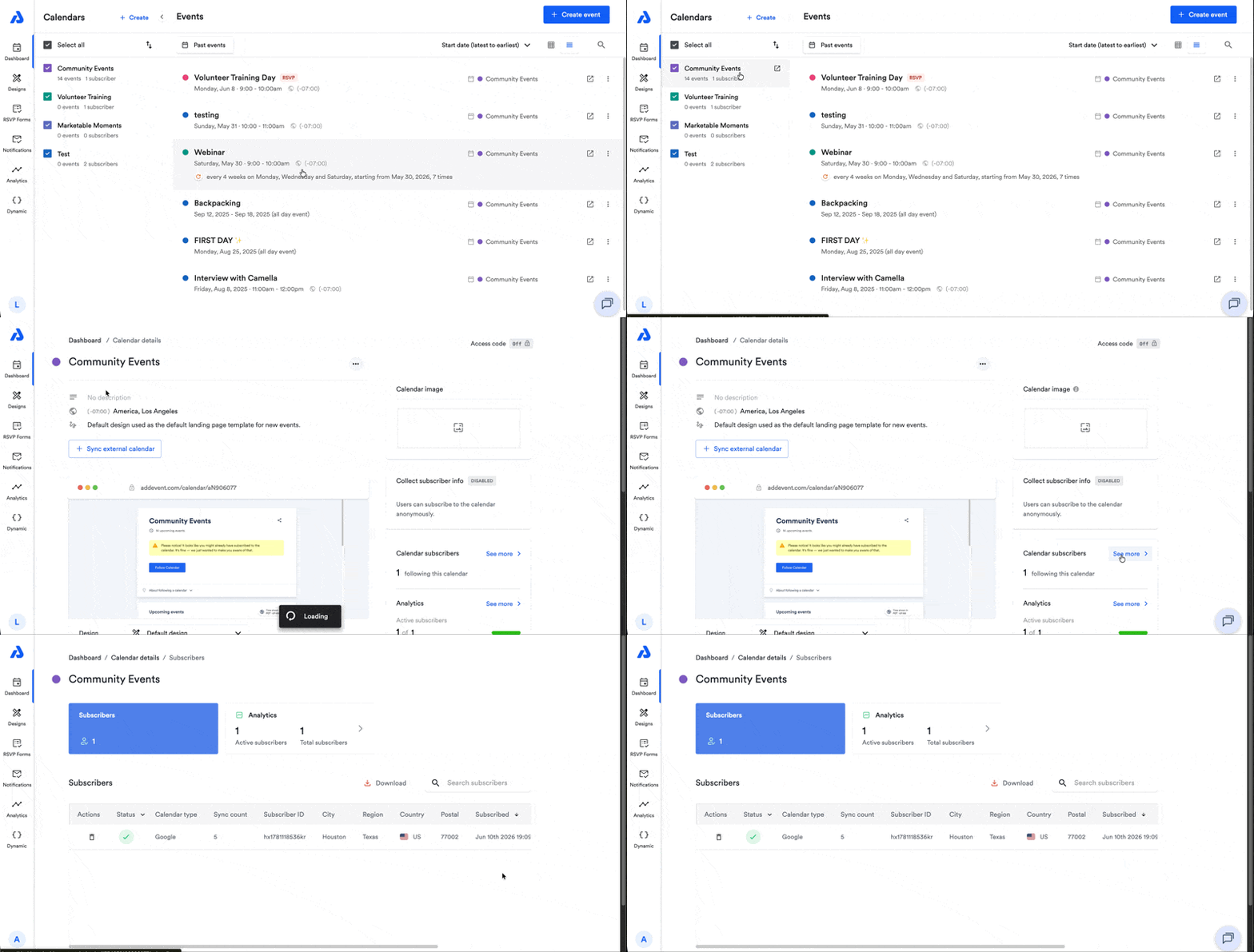
Subscribers List Details
| Column | Description |
|---|---|
| Actions | Allows you to delete a subscriber by clicking the trash can icon. To learn more about deleting subscribers, see our help doc here. |
| Status | Provides information on whether the subscriber is active, inactive (unsubscribed), or blocked. Tip: You can apply a filter to this column by clicking the down arrow to narrow down your subscriber list between active, inactive, and blocked subscribers. |
| Name | If you choose to collect information from your subscribers and you collect their name, you will find your subscribers' names in this column. |
| If you choose to collect information from your subscribers and you collect their email address, you will find your subscribers' email addresses in this column. | |
| Calendar type | Provides the calendar service each subscriber used to subscribe to your subscription calendar. |
| Sync count | Provides the number of times that the subscriber's calendar service has synced with your subscription calendar. |
| Subscriber ID | Provides a unique ID for each subscriber. |
| City | Provides the the city in which the subscriber is located. |
| Region | Provides the the region in which the subscriber is located. |
| Country | Provides the the country in which the subscriber is located. |
| Postal | Provides the the postal code in which the subscriber is located. |
| Subscribed | Provides the timestamp of when subscribers subscribed to your subscription calendar. |
| Last synced | Provides the timestamp of when the subscriber's calendar service last synced with your subscription calendar for updates. To learn more about subscription calendar syncing frequencies, see our help doc here. |
Updated 4 months ago
Did this page help you?